Ask Your Fleet Anything: AI-Powered Analytics Come to the Blynk MCP Server
The Blynk MCP server now answers fleet analytics questions in plain language, from Claude, Cursor, or any AI tool you already use. And it can act on what it finds.
Published
August 26, 2026
Author
Henrik Holen
Here is a real exchange with a demo fleet of rooftop HVAC units connected to Blynk: simulated units, live platform, real answers.
"Rank my RTUs by max superheat."
Building B East: 41.7°F. That's 20.5°F above the next highest unit, against a fleet median of 21.2°F. One device is clearly not like the others.
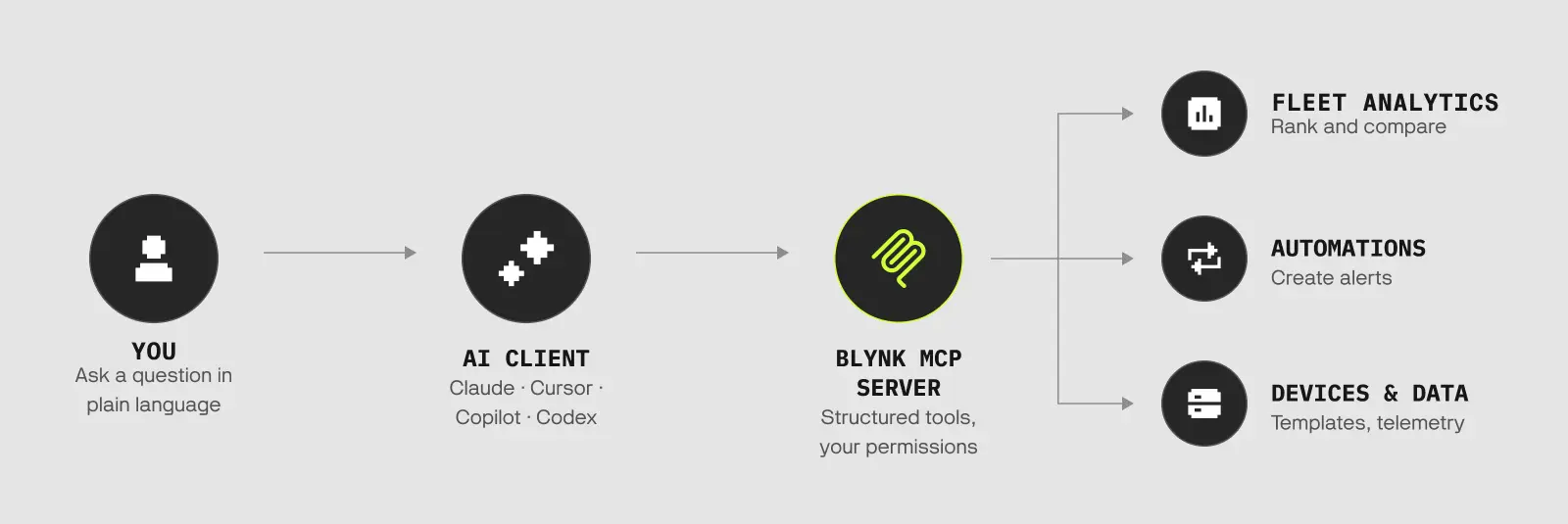
That exchange runs on a new analytics layer in the Blynk MCP server. This release adds fleet-wide query tools to the MCP: segments, aggregation, statistical summaries, ranking, and period comparison, with answers typically returning in under a second. They join the automation and template tools the server already had, so the same session that finds a faulted unit can also create the alert that catches the next one earlier.
Where this fits
If you haven't come across MCP: the Model Context Protocol is an open standard, introduced by Anthropic in late 2024, for connecting AI assistants to external tools and data. OpenAI and Google adopted it in 2025, it now lives under the Linux Foundation, and there are more than 16,000 MCP servers in the wild. In practice it means tools like Claude, Cursor, Copilot, and Codex can work with systems like Blynk directly, with your permission and your account's access rights.
We shipped the hosted MCP server in February. It lets you manage the platform from your editor: create templates and datastreams, register devices, read telemetry. Useful, but management was only half the story. In the same month, when we introduced the Blynk AI Assistant, we wrote that a data analyst agent was in development, one you could ask "What's the average uptime for my HVAC units this month?"
This release delivers it: the Blynk MCP server now includes a full fleet-analytics layer.
What the analytics layer does
The new tools cover the questions an operations team actually asks of a fleet:
Segments. Filter your fleet by status, template, location, owner, tags, or metadata, with time conditions. "Which devices haven't connected in three days" is a one-line question instead of a saved filter you have to maintain.
Aggregation and statistics. Averages, minimums, maximums, sums, and counts across any segment, plus proper statistical summaries: percentiles, mean, standard deviation, and coefficient of variation. Every answer reports coverage, so you know it reflects 100% of your devices or 60% of them.
Ranking. Top-K devices by average, maximum, or minimum of any datastream. This is the tool behind the superheat example above, and it generalizes: rank battery-powered units by lowest voltage, cellular devices by data consumption, tanks by fill level.
Period comparison. Current window against a baseline window, with deltas and percentage change. "Is this week worse than last week" as a question rather than two exports and a spreadsheet.
Semantics. We ship 73 built-in datastream meanings, from superheat and vibration to cellular signal and fill level, plus custom tags. This is what lets the AI understand that a datastream is a temperature and not just a number, and it's a layer the AI doesn't get when it's simply handed raw tables.
An AI layer that can only read your data can describe a problem, and that's where the conversation ends. Whatever it finds, acting on it is your job, in another tool, later. Many of the new AI-plus-IoT products launching now work this way. We went a different way.
Our MCP server is not read-only. It has the same automation, template, and datastream tools it has had since February, sitting next to the new analytics tools. That combination changes what a session can accomplish:
The superheat ranking above finds one faulted unit. The natural next sentence in that session is:
"Create an automation that emails me when superheat on Building B East goes above 35°F."
And the low-code platform builds it, through the same MCP session, respecting the same permissions. You find the problem and handle it in the same session.
And the platform on the other side of the conversation is the full one: over-the-air firmware updates, role-based user and organization management, native mobile apps for your operators, SOC 2 Type II audited infrastructure. What a session finds lands somewhere built to act on it.
Structured tools, not AI-written queries
Some AI analytics products work by having the model write SQL against your data. That buys flexibility, and it has a known failure mode: the model can write a query that looks right and isn't, and you may not notice.
We took the other path. The MCP server exposes structured analytics tools with fixed, well-defined shapes. The AI chooses which question to ask and with which parameters; it never writes raw queries against your production data. Results come back with coverage statistics attached, so you can see when an answer is based on partial data. And every tool respects your role's permissions, with structure-modifying operations additionally gated behind Developer Mode in your profile.
The trade-off is real: a fixed menu of query shapes can't answer every question a SQL surface can. In exchange, every answer is computed by the platform, not composed by the model.
Try it on your own fleet
The Blynk MCP server is hosted at blynk.cloud/mcp. Add that URL to any MCP-compatible client, sign in with your Blynk account via OAuth, and your fleet's devices, templates, and data are available to the conversation.
The analytics layer is live for all Blynk accounts, on every plan, including the free tier. If you connected the MCP server back in February, the new tools are already in your session; there is nothing to enable.
A good first question to ask is the one every fleet has an answer to: "Which of my devices haven't connected in the last week?" Then try the one from the top of this post, adapted to whatever your devices measure.






.png)