Blynk Snapshots Keep Your Device Data When Devices Change Hands
Save historical usage for shared devices and keep each assignment separate.
Published
February 5, 2026
Author
Pavlo Bayborodin
When devices change hands, standard IoT platforms lose the data. Snapshots preserve historical records while giving each new assignment a clean slate.
Three months after checkout, you get an email. A former guest disputes their utility charges. They claim the air conditioning wasn't running that much, and the bill doesn't match their memory of the stay.
You know the HVAC was working fine. You have sensors in every unit. But when you go to pull the data, it's not there. The device was reassigned to the next guest, and in your IoT platform, that meant the previous data got wiped. You're left defending a charge with nothing but your word against theirs.
This is the data segmentation problem. Most IoT platforms store device data as one continuous stream. They don't automatically separate it by who had the device and when. Which means when a device changes hands, operators are left manually exporting, labelling, and archiving the previous period's data. Or just hoping they won't need it later.
A Different Approach
Consider a property management company that's solved this. They run vacation rentals across multiple locations, each equipped with smart monitoring: electricity meters, water sensors, HVAC tracking.
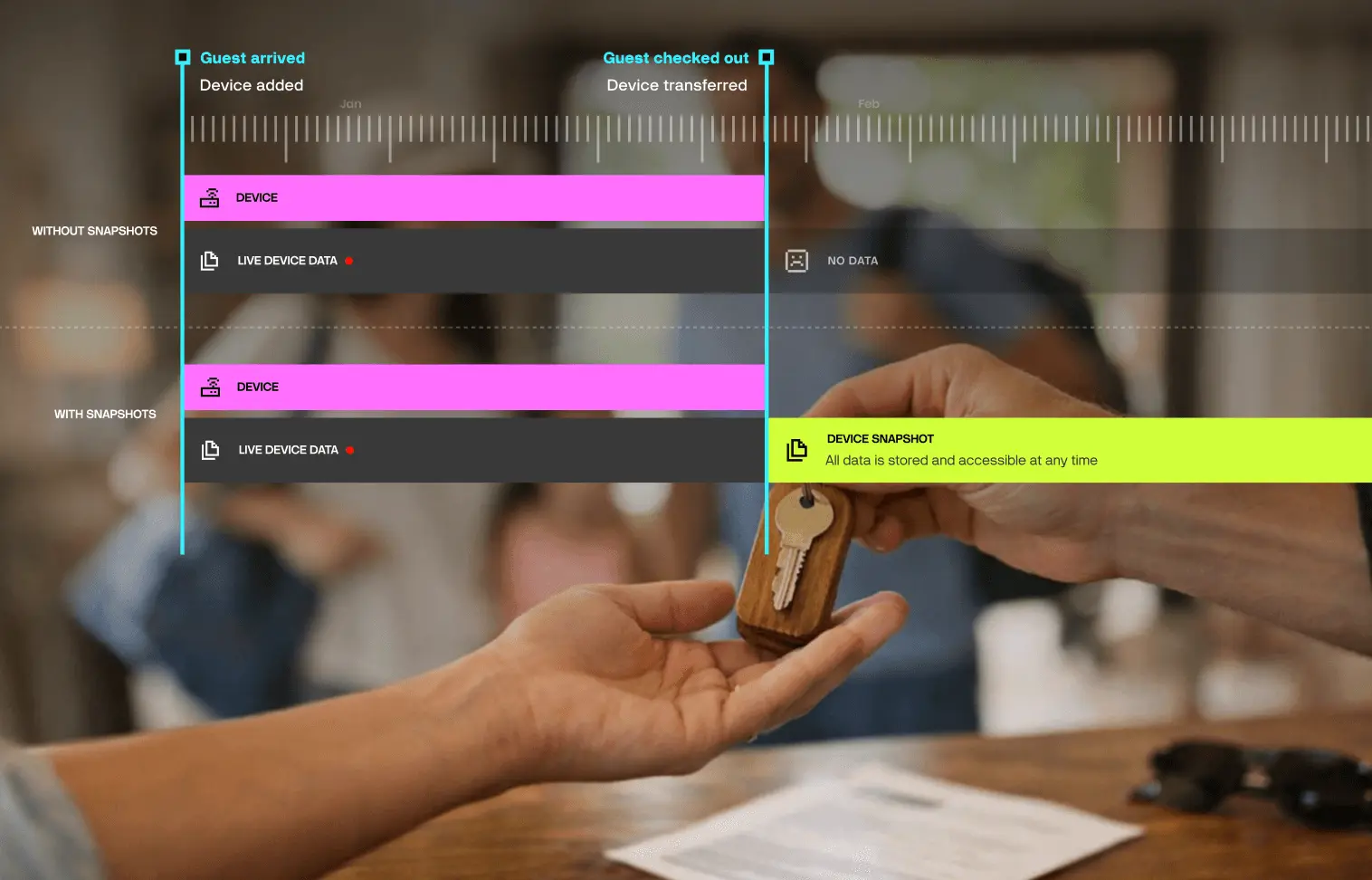
When a guest books, they get their own account in the system and see their own dashboard: current electricity draw, water consumption, HVAC status. Real-time data from their stay only, nothing from before.
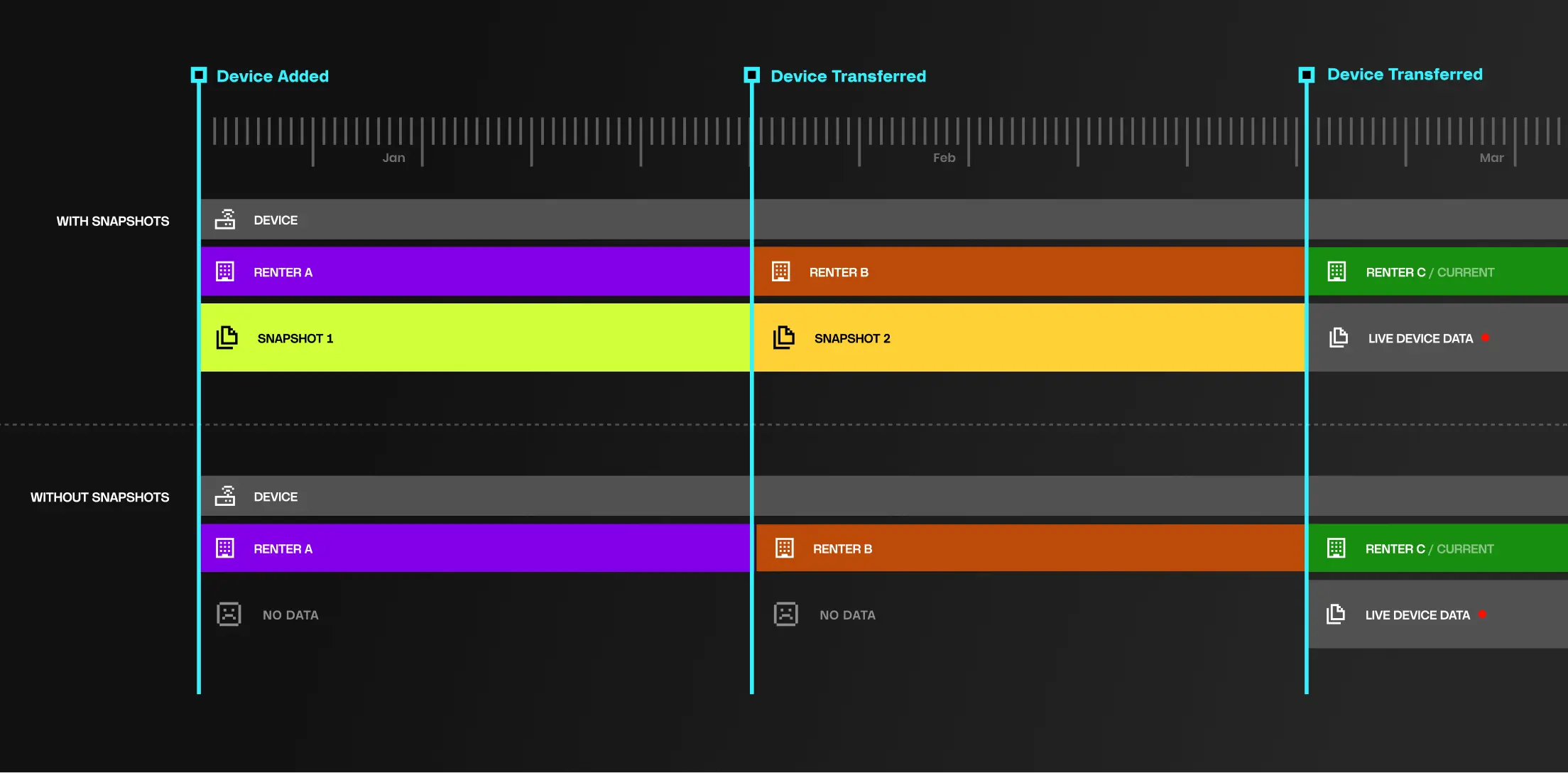
Here's what's different: when that guest checks out, the system doesn't wipe anything. Instead, it archives everything from that stay into a permanent record: timestamped electricity consumption, water usage patterns, HVAC runtime, any alerts or anomalies. All of it exportable, searchable, and attributable to that specific stay period.
The next guest arrives, gets access, sees a fresh dashboard. Their view starts clean. But behind the scenes, the previous stay's data still exists, untouched.
The key shift: Privacy between tenants isn't a policy you hope staff follow. It's structural. Each assignment period's data lives in its own snapshot, completely isolated. And because snapshots are tied to organisations in the Blynk hierarchy, this works just as well for multi-user setups. A rental company with installers, managers, and support staff can all access the same org's snapshot without breaking the boundary between tenants.
So when that billing dispute arrives three months later, the conversation is different. "Here's your stay's data. The AC ran an average of 9 hours a day. Here's the full log if you want it." Actual data, from their actual stay, with their name attached.
How Snapshots Work
The mechanism is simple. While a device belongs to an organisation, data accumulates normally and shows up in standard Blynk views, charts, and reports. When the device moves to another organisation in the hierarchy, that accumulation completes and becomes an archived snapshot. The next organisation starts a new one.
What gets captured:
Raw datastreams: Every value from every sensor, recorded with exact timestamps. Electricity, water, temperature, humidity, occupancy. The raw readings, not aggregates.
Events: Alerts, mode changes, connectivity drops, system events. Anything notable that happened during the assignment period.
Business context: Operators can enrich snapshots with additional metadata using Custom Data, like contract IDs, tenant details, or pricing tiers. So the archived record isn't just sensor readings. It's a complete picture of that assignment period.
Retention: Configurable per deployment. Archived snapshots aren't subject to the same retention limits as live data, so operators can keep records for as long as they need.
Beyond Rentals
Rentals are one scenario, but any business where devices change hands will have the same problem.
Equipment rental companies use it to capture complete usage logs for each rental period. Proof of how the equipment was treated, not just that it came back. Shared mobility operators use it to give each rider their own trip history while maintaining full device lifecycle data for maintenance. When devices get replaced under warranty, the old device's snapshot completes and survives the swap, giving context for future claims.
In each case, the value is the same: data that outlives the individual assignment, while maintaining separation between each assignment period.
What Changes
For operators, compliance records build themselves. No manual exports before checkout, no spreadsheets tracking what got saved where. The archive just accumulates as you operate.
For users, privacy is guaranteed by architecture, not procedure. One guest's data can't leak to another because they exist in separate snapshots.
And for the property manager who gets that billing dispute email three months later? They have an answer.
Sign up for a newsletter
Get latest news from Blynk
Over 500,000 people already signed up our newsletter. We never spam.
Thank you! Your submission has been received.
Oops! Something went wrong while submitting the form.





.webp)

.png)


